I’d been driving most of the day.
Four hundred miles home from K3LR after the CQ World Wide SSB contest. I was beat. The kind of tired where you sit in the driveway a minute before you open the car door.
But it was Monday. And Monday night is Pack Rats night.
So I walked the 500 feet out to the shack, climbed the stairs past the workshop, and fired up the VHF station.
I caught net control right at the start. Swung the beam his way, heard him fine. Followed a couple of the big signals as they checked in.
Then the net started working its way around the compass, and I started falling behind.
By the time I figured out who was talking and where they were, they were done. The strong stations I could find. The weak ones — the ones I actually wanted — were gone before the Yagi got there.
I made it through two nets and gave up.
Somewhere on the walk back to the house, I thought: I could build something for this.
The new guy on the net
I started chasing weak-signal VHF before I was even a Pack Rats member. My first antennas covered 6 meters, 2 meters, 222 and 432. Then 1296. Now 902 too. So Monday night isn’t one net for me. It’s a string of them, one per band, each about thirty minutes long.
Pointing at net control at the start is easy. Keeping up is not.
The regulars know the routine. Net control knows the regulars. Half the time a station gets called by first name, no grid, no location. Everybody in the room knows where everybody lives.
Except the new guy.
And then there’s my favorite: “I’m pointing north now.”
North from where?
His north is not my north. Net control might be thirty miles from me in any direction. The stations north of him could be northwest of me, or due west, or almost behind my beam. Maybe I’m just not smart enough, but I couldn’t work that geometry out in my head at the pace these nets run.
Thirty minutes a band doesn’t leave a lot of room for trig.
Everybody helped
People were generous. Alan K3WWT, who runs the DVFRC Friday night 6 meter net, sent me his spreadsheet of the stations that check in. Most net controllers post their rosters to the Pack Rats reflector after the net. Mike WB2RVX spent time with me testing every band and making sure my rotator was actually pointing where I thought it was. Ray N3RG and Scott AA2SD were always helping me along, finding parts and equipment for the journey. And the Pack Rats and Philadelphia beacons are a gift when you’re lining up antennas.
All of that is homework.
None of it helps you when the net is live.
Live, you’re spinning the rotator and the dial at the same time, trying to keep up with conversations that might last fifteen seconds or three minutes. A long one gives you time to find the station. A short one is over before you get there. And these Yagis don’t forgive much. You have to be on the station, not near it.
What I built
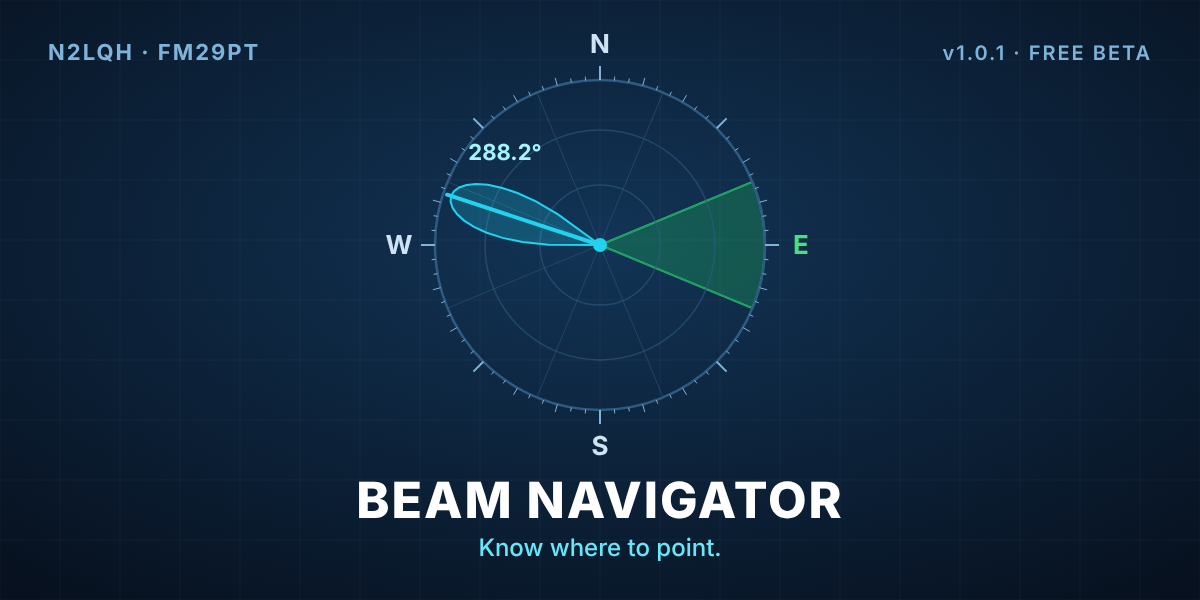
Beam Navigator answers one question fast: which way do I point?
Type a callsign, grid square, state, compass point or a shortcode, and it gives you the true bearing and distance from your station. Not net control’s. Press Rotate, or Ctrl+Enter, and the antenna turns.
That’s the dashboard. The net screen is where it earns its keep.
Updated November 22 for version 1.5.0. The net screen got a redesign over the first weekend, and it’s been getting simpler ever since.
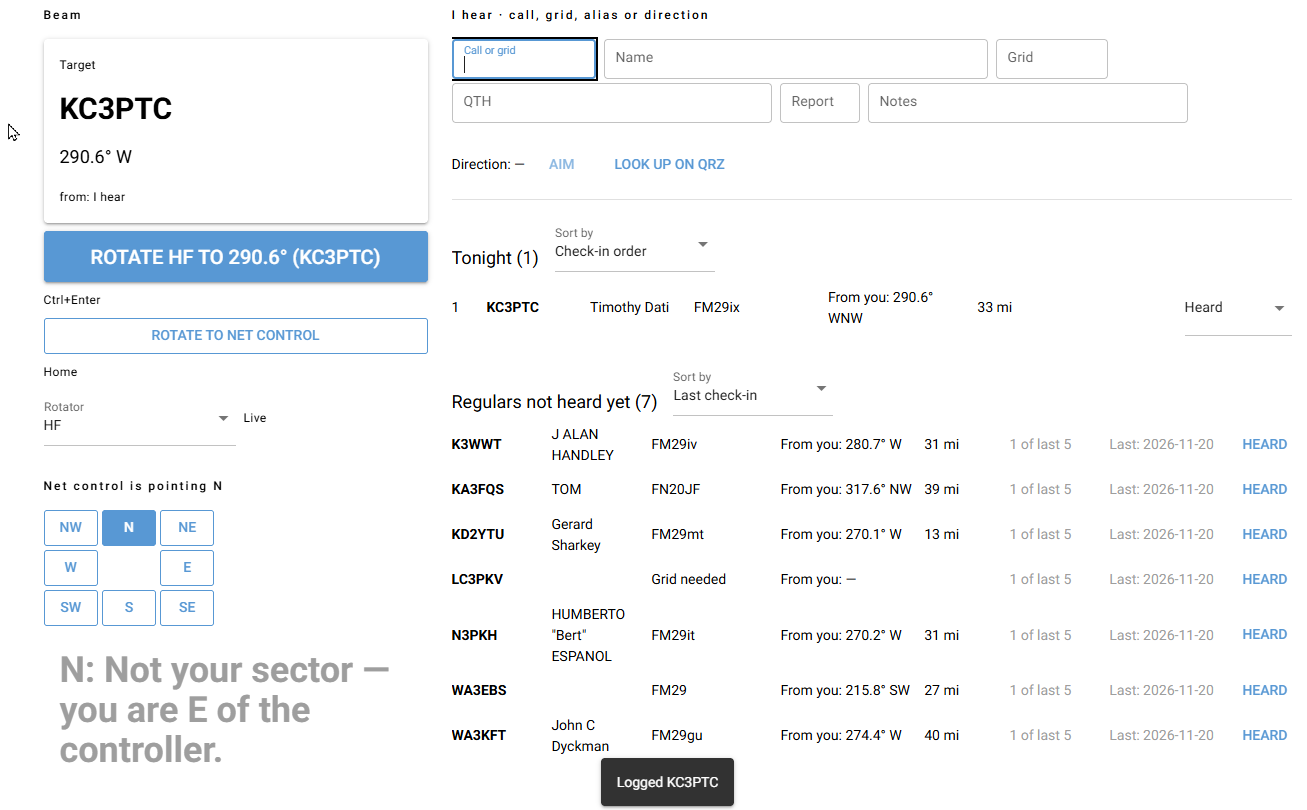
- The Net control line at the top shows who’s running the net, and my bearing and distance to them.
- The compass works out where net control has to point to hear me, and which sector I’m in.
- When net control asks “anybody to the east?”, I hit 6 on the number pad. If east is my sector, a big green YOUR SECTOR IS UP shows up. If it isn’t, I stay put.
- When net control just calls a station, the compass lights up the way net control is beaming and reads Net control is pointing SW. I can tell at a glance whether it’s my turn to listen.
- Whatever I picked last is the Target, and Rotate turns to it. Home is Rotate to net control, one press after a contact.
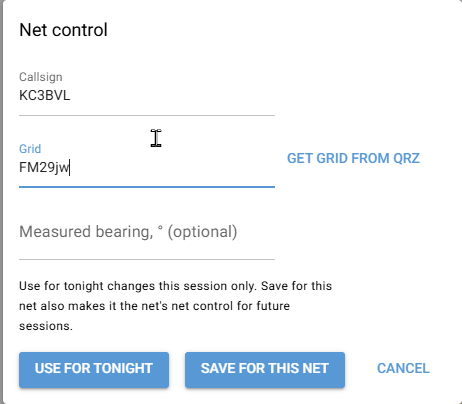
- Someone else running the net tonight? Use for tonight. A net with no net control on file? Save for this net, and it’s fixed for good.
- One box, I hear, does it all. Type a call and pause, and the name, grid and location fill in. It becomes the Target, so Ctrl+Enter turns the beam and Enter logs the check-in. Type a grid or a direction instead, and Enter just points me there. Regulars not heard yet shows who usually checks in and hasn’t yet.
- When the net ends, Close my session takes a note, like “weak from 40°, try 30°.” It comes back as Last time at the next session.
That banner was the whole reason I started. It turns “I’m pointing north” from net control’s north into my answer.
After the net, I paste the roster from the reflector. Beam Navigator saves the stations and grids, so next Monday the regulars aren’t strangers anymore. If the roster leaves out a grid, it fills it in from my saved stations or QRZ, and says which. If the roster prints bearings from net control, they’re kept for reference and labeled “Published.” My own headings always get worked out from my station.
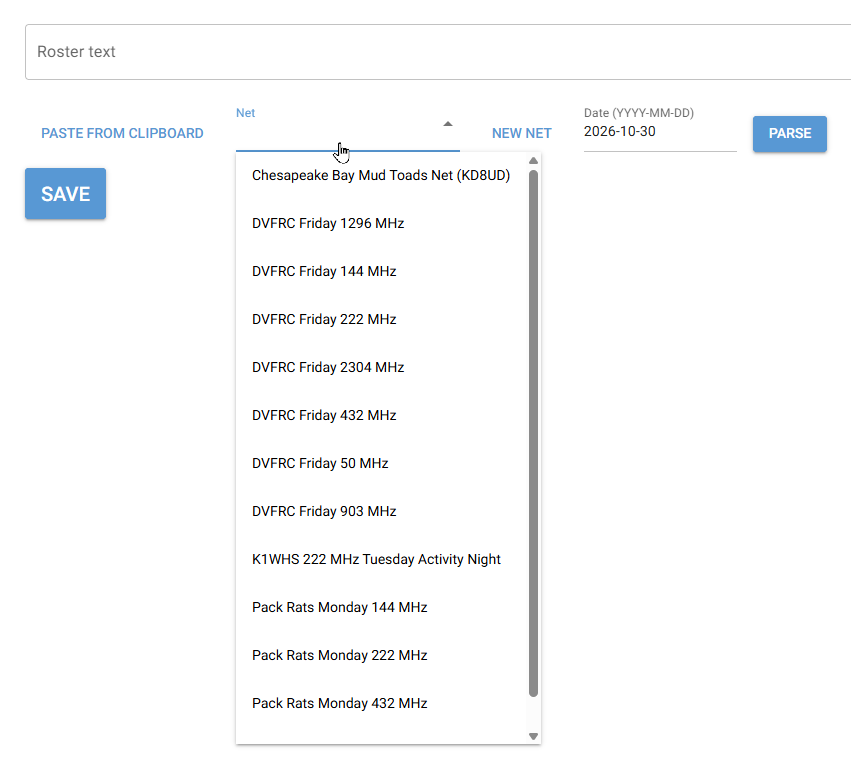
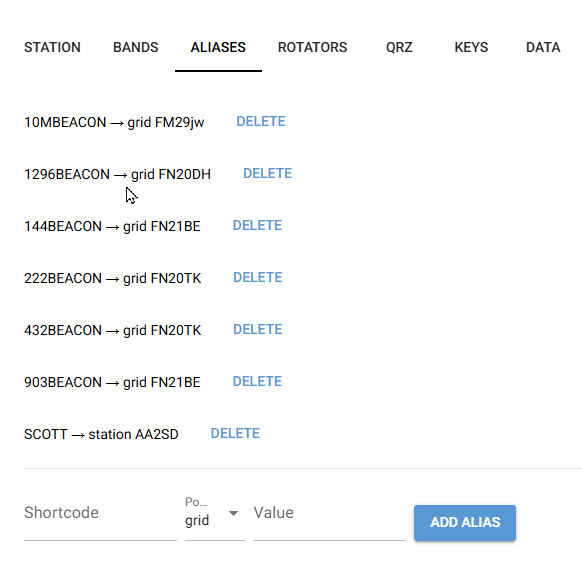
The beacons became shortcodes. Type 144BEACON or 1296BEACON and you’re lined up. Same for friends. Typing SCOTT points me at Scott AA2SD.
For the folks running the net
Net controllers get a keyboard-first logging line, the same feel as a contest logger. Callsign, Enter, and name, grid and QTH fill in from history or QRZ. Regulars come up after two or three characters, ranked by how often they show up. Nobody gets logged twice.
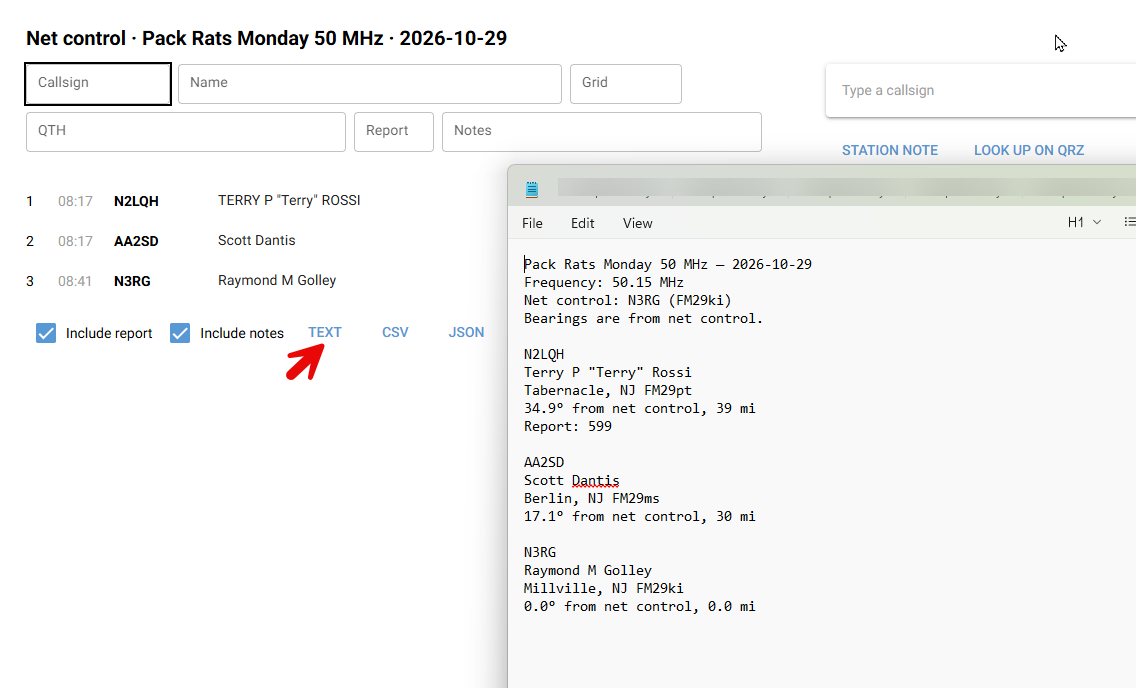
When the net is over, export the roll call as text, CSV or JSON. Bearings are labeled “from net control.” If net control’s location isn’t known, the export says so, and the bearings come from your own station instead of pretending otherwise.
Want to see every screen? I walk through them all, with notes from the user guide, in Beam Navigator, screen by screen.
Why it isn’t just “add 180”
Here’s a thing I learned building this.
To figure out where net control points to hear you, most of us take our own bearing and flip it 180°. Across town, that’s fine. Out at the edge of the net, it isn’t.
Real numbers from my station in FM29pt:
- KC3BVL in FM29jw, about 28 miles out. I point 288.2°. Flip it and you get 108.2°. The real answer is 107.9°. Close enough.
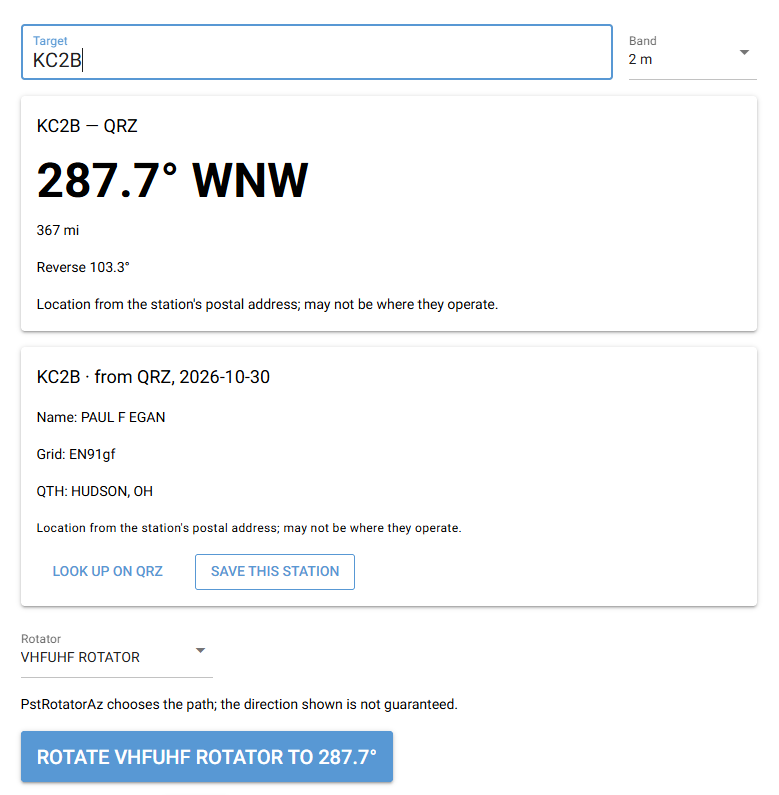
- KC2B in EN91gf, Hudson, Ohio, 367 miles out. I point 287.7°. Flip it and you get 107.7°. He actually has to point 103.3° to find me. That’s 4.4° off.
The reason is the earth is round. The shortest path between two stations is a great circle, and its heading changes along the way. The farther apart you are, the more the two ends disagree with a simple flip.
Is 4.4° the difference between a contact and nothing? Not by itself. My Yagis are wider than that. But on a weak signal near the edge of the net, every fraction of a dB counts, and it’s one less number I’m guessing at. Beam Navigator works out each direction from scratch.
Software that doesn’t lie to you
I cared about a few rules more than any feature.
Nothing moves unless you press a button. Every new rotator starts in simulation. It can’t go live until it passes a connection test. Restore a backup and every rotator drops back into simulation until you test it again. No surprises at the tower.
It doesn’t claim the beam got there. If the rotator doesn’t report its position, the screen says “Command sent — position unverified.” After going through every band with Mike WB2RVX, I’d learned not to assume the beam is where the dial says. There’s an offset setting for exactly that.
It never guesses a location. No grid, no bearing, until you give it one. QRZ lookups only fill blanks, and when QRZ only has a postal address, the screen says it may not be where they operate.
The banner never promises net control can hear you. It tells you your sector is up. The rest is still radio.
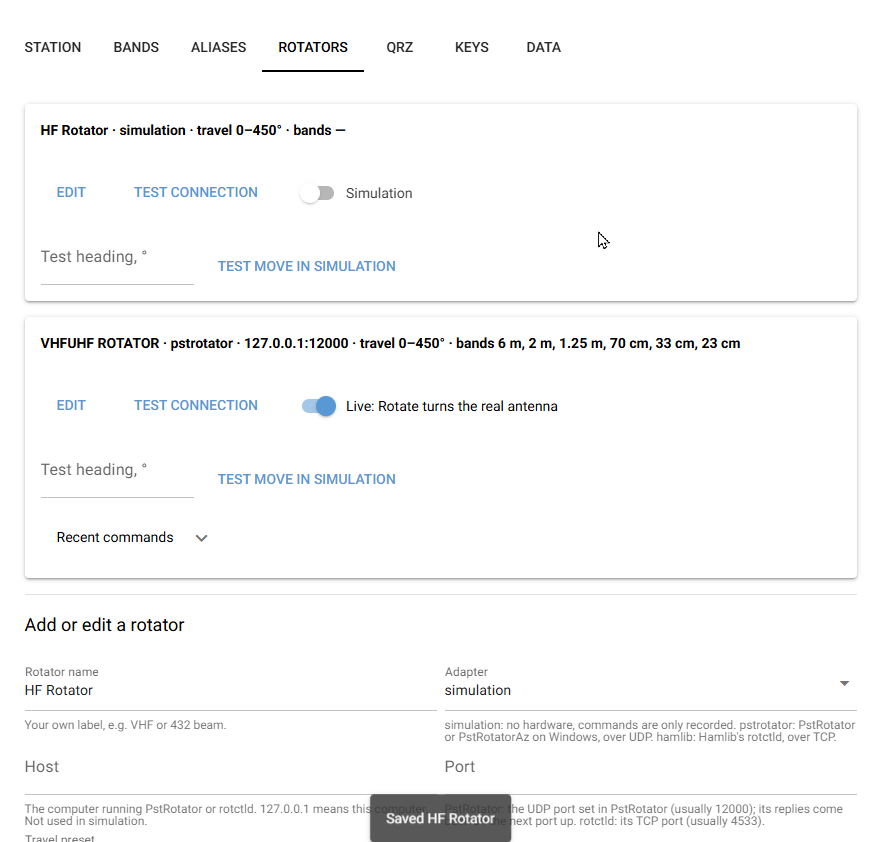
For rotator control I went with PstRotatorAz and Hamlib’s rotctld. Between the two, that covers most of the rotators hams actually own. The VHF rotator here runs through PstRotatorAz, same as everything else in the shack.
Four days with Claude Code
I’ll be honest about how this got built. I didn’t write the code. Claude did. All of it.
The morning after that Monday, I opened Claude Code with three agents I’d already set up:
- spec-writer takes a rough idea in plain English and turns it into a requirements document and a starting plan. It doesn’t write any app code.
- test-writer writes tests, runs them, and reports what passed and what failed. It won’t touch the app code. If it finds a bug, it tells me.
- ux-design-agent opens the running app in a real browser and reviews the layout, accessibility and spacing. It only reports.
My job was to know the problem cold, describe it, answer a lot of questions, and approve the work. My setup never writes code or changes anything unless I say yes.
Same rule as the rotator. Nothing happens behind my back.
The spec-writer wasn’t always on the money. We changed things and moved on. The test-writer caught plenty of bugs. Some were easy fixes. Some took a little more finesse. All of them got fixed.
Four days later I had a working beta, a Windows program, and a user guide.
It didn’t stop there. By the end of the first weekend there were four more releases, including a redesigned net screen and a proper Windows installer. Versions 1.4.0 and 1.5.0 followed. The 1.5.0 changes came straight out of a Friday night 6-meter net. Same rules every time. Spec first, tests second, my approval on every change.
What actually matters
- Bearings from your station, not net control’s. That one idea is most of the app.
- One keypress beats doing math. Thirty minutes a band goes fast.
- Import the roster every week. The net gets easier every time you do.
- Calibrate your rotator first. Software can’t fix a beam that’s pointed wrong. Get a friend and a beacon and check it.
Try it
Version 1.5.0 is a free public beta, open source under GPL v3. On Windows it’s a simple installer, and it runs on macOS, Linux and Raspberry Pi too. It works offline, and your data stays on your computer, or in one shared folder if you run it on more than one PC in the shack. QRZ lookups are optional and need a QRZ XML subscription. Without a rotator you get everything except the Rotate button.
- Download Beam Navigator v1.5.0
- Beam Navigator, screen by screen
- Source code and user guide on GitHub
It’s built for weak-signal VHF, UHF and microwave nets, 10 meters and up. If you run a net, or you’re the new guy on one, I’d love to hear how it works for you. Email me at beam-navigator@n2lqh.com, or open an issue on GitHub.
Monday night I’ll be back on the Pack Rats nets. Same antennas. Same rotator. Hopefully a little less tired.
This time I’ll know north from where.
73 de N2LQH · Terry Rossi · South Jersey